
The DJI Mini 3 Pro is an excellent all-around drone, as it fits into many different scenarios. For those new to the hobby, it is a great drone to learn to fly drones.


Travelers and those on vacation will love its portability. For social media-orientated operators, the Mini 3 Pro is a very capable media-producing drone. For those that are photography and video professionals, in a pinch, the Mini 3 Pro is a solid backup drone.


The Mini 3 Pro is absolutely worth buying, whether you are new to the hobby, upgrading from a previous Mini drone, looking to add a fun addition to your fleet, or looking to create great online media content.
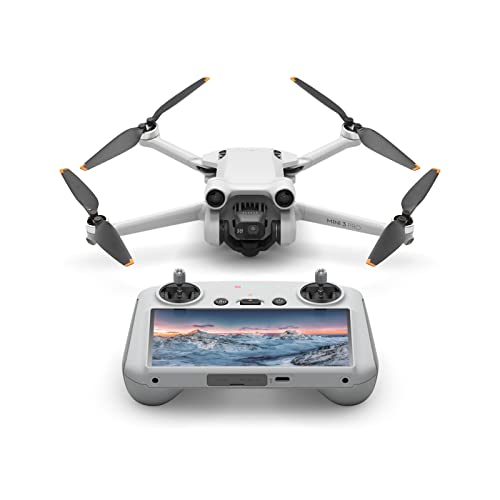
Design 9 · Ease of Use 8 · Value 8
- Sub 250g
- Vertical Shooting
- Tri-directional obstacle avoidance
- New plus batteries
- 4k 60fps video
- 10 Bit Video Color
- Considered a Pro model, but has no 1″ camera sensor
- Not a true 48MP image
- No top-facing obstacle avoidance sensors
- 1.2GB of internal storage

Major Technical Details/Specs
| Weight | 249g |
| Maximum Flight Time | 34 Minutes – Standard Battery |
| 47 Minutes – Plus Battery | |
| Operating Temperature | 14° to 104° F or -10° to 40° C |
| Obstacle Avoidance | Forward, Backward, Bottom |
| Camera Sensor | 1/1.3-inch CMOS |
| Pixels: 48MP | |
| Camera Lens | FOV (Field of View): 82.1°; 24mm Equivalent |
| Aperture: f/1.7 | |
| Photo Format | JPEG & RAW (DNG) |
| Max Video Resolution | 4K 60FPS |
| Max Video Bitrate | 150 Mbps |
| Color Profiles | Normal, D-Cinelike |
| Supported Memory Cards | UHS-I Speed Class 3 or above; up to 512GB |
| Internal Memory | 1.2GB |

To help, we’ve identified and reviewed the best drone courses for beginners and professionals.
DJI Mini 3 Pro Full Review
When I got into the hobby of flying drones so many years ago, I flew recreationally quite a bit. Once I began using drones professionally for clients, I no longer flew “for fun”, as commercial flying took up all of my time.
Enter the Mini 3 Pro, the drone I didn’t know I needed. The Mini 3 Pro has changed the way I fly. This might sound drastic. However, it is true.
The Mini 3 Pro is so convenient and fun to fly (with the DJI RC) I find myself bringing it almost everywhere I go, whether or not I intend to fly.
Because of the Mini 3 Pro, I am once again making time to fly recreationally.
Combos
As with most of the newer lines of DJI drones, there are Mini 3 Pro purchase options to fit pretty much everyone’s needs and budget:
- DJI Mini 3 Pro – Includes 1 standard battery and the RC-N1 Controller
- DJI Mini 3 Pro (DJI RC) – Includes 1 standard battery and DJI RC with an integrated 700nit screen
- DJI Mini 3 Pro (No RC) – Includes 1 standard battery and the drone only
In addition to the above-mentioned purchase options, there are also 2 Fly More Combos that are sold separately from the Mini 3 Pro options:
- Mini 3 Pro Fly More Kit – Includes 2 standard batteries, spare props, charging hub, and carrying bag
- Mini 3 Pro Fly More Kit Plus – Includes 2 plus batteries, spare props, charging hub, and carrying bag
What option is right for you?
This is a question that is asked a lot, especially from those that are new to drones.
The correct option for you would be based on a few different things, such as:
- Do you already own an RC-N1 controller from previous drones, as they work with the Mini 2, Air 2, Air 2S, and Mavic 3/3 Cine?
If so, the Mini 3 Pro (No RC) might work well for you, especially if budget/cost is a concern.
- Are you new to drones and looking for a cost-effective package that’ll get you up in the air immediately?
Then the standard Mini 3 Pro would be the way to go. The RC-N1 is included, and this package is a few hundred dollars less than the DJI RC option (cellphone or smart device required).
- If there are no budget concerns and you’d like the best experience of the 3 options, the Mini 3 Pro with DJI RC would be perfect for you. The 700nit integrated screen will get you up in the air and flying in record time.
Thoughts on the 2 Fly More Combos
If you are familiar with my reviews, then you have heard me say time and time again that extra batteries are a must.
Although the standard battery included with the Mini 3 Pro will get you a solid 30 minutes or so of flying (more on that later), it is simply not enough. Purchasing a Fly More Combo is almost a necessity.
Below is the entire list of what is included in the standard and plus Fly More combos:
- 2 Intelligent Flight Batteries (Standard or Plus – depending on Combo)
- 1 Two-way Charging Hub
- 2 Pairs of Propellers
- 12 Screws
- 1 USB 3.0 Type-C Data Cable
- Shoulder Bag
While I’ll be speaking more on the Propellers and Batteries later, I thought I might mention the shoulder bag.
Shoulder bag
While I normally like to get hard cases for all of my drones, in this case I opted to stick with the shoulder bag.
The main reasons for doing so are:
- I’m not using the drone commercially, so a rugged case is not really necessary,
- And the shoulder bag is convenient, low-key, and unassuming.


The shoulder bag resembles the Air 2S shoulder bag but is just slightly smaller. Everything included in the Fly More combo fits…albeit kind of snugly.
In addition to putting everything included in the Fly More combo in the bag, I also put my 3rd party ND filter set in there, as well as a fairly large aftermarket 30-watt multi-charger, and there is just about enough room for everything I have Mini 3 Pro-related.


Charging hub


I’m a big fan of the charging hub. It was designed to be brought with you while keeping all of the batteries together in one place, not sliding or bumping around in a pouch, pocket, case, or bag.
A complaint I initially had was that there is nowhere to find out how much remaining battery power there is in each battery without putting the battery in the Mini 3 Pro, as there is no indicator on the physical batteries.
This has been addressed with the battery hub. As can be seen above, you can check each battery’s remaining power on the hub itself by simply pressing a button on the side of the hub.
You’ll be presented with LED light indicators on the bottom of each battery chamber for approximately 5 or 6 seconds. Next to the LED indicator button, there is also a full-sized USB slot used to charge your other electronic devices, using the batteries in the hub and your charging cable of choice.


Again, the battery hub is well thought out and executed.
Combo pros
Both combos include 2 batteries. However, the plus combo includes batteries that are rated to fly for 47 minutes. I personally do not have plus batteries and am using a standard Fly More kit.
Leisurely flying my Mini 3 Pro the past month and even with extensively filming various areas, I never ran out of batteries.
Combo cons
A major con many are commenting on is that there is no power adaptor of any kind included in either the Mini 3 Pro purchase options or in the Fly More combo.
This is akin to Apple omitting their power adaptors for new iPhones. While this might only be a nuisance for iPhone users (as they most likely have adaptors from previous phones), for Mini 3 Pro owners, it is more than a little irritating.
As it stands, in order to charge the battery in the Mini 3 Pro itself or the charging hub, you’ll need to purchase a separate 30-watt charger. While not extremely expensive, having to pay an extra $19USD seems like a cash grab.
If you have a 30-watt Apple iPad charger at home, this will work for you. If not, you’ll need to purchase an adaptor.
The 2nd con, for me, as a video shooter, might not affect many. With the Air 2S and Mavic 3 Fly More combos, an ND 4/8/16/32 filer set was included, but with the Mini 3 Pro, there is not.
Included ND filters are great for video shooters, as it enables you to get the proper motion blur, using the 180° rule, immediately upon flying the drone for the 1st time.
Having none included meant either waiting for 3rd party manufacturers to distribute their own or purchasing DJI’s very expensive sets, which contained fewer options than many 3rd party manufacturers.
The Mini 3 Pro Drone


The Mini 3 Pro has deviated somewhat from the DJI Minis of the past, ditching the sleek, aerodynamic front for a more organic, almost frog-like appearance.
This change appears to have been done to accommodate the new front sensors.
Build quality
One thing that has to be mentioned right off the bat is that the Mini 3 Pro is a sub-250g drone. Because of this, materials had to be used that lighten up the drone, significantly. When you pick the drone up for the first time, the thinness and lightness of the drone are almost alarming (for those that have never flown a DJI Mini drone).
To me, it almost felt like a toy. Don’t let the weight fool you, however. When turning the Mini 3 Pro over and over in hand, it is clear to see that DJI put together a solid, albeit, very light and capable drone.
Even though very light, the drone is not flimsy whatsoever. On the contrary, the Mini 3 Pro is pieced together quite well.


One of the things new to the Mini line, and, dare I say, Mavic line as a whole, including the Air series, is that you can unfold the arms and legs of the drone in any order.
Gone are the days of having to remember and commit to muscle memory the unfolding sequence. Simply pick the Mini 3 Pro up and unfold it any way you find convenient.


Size/Weight
As mentioned and as the name Mini denotes, the Mini 3 Pro is a tiny and lightweight drone. The official weight is 249g when using the standard batteries and omitting the use of any prop guards.


The reason so many people are enamored with the weight of the Mini series boils down to one thing in the US: Sub 250g drones do not need to be registered with the FAA. Plain and simple.
As the owner of a small business that uses all types of drones, registering them is no big deal for me. However, for many, registering a drone can be seen as an unnecessary added step that might encroach on a hobbyist’s sense of privacy.
It is good to note the following when it comes to the Mini 3 Pro:
- If you add propeller guards or fly with the plus batteries, you will need to register the drone, as it will no longer fall in the “under 250g” category here in the US.
- If you plan to use the Mini 3 Pro commercially (for the furtherance of business), you will need to register the drone. No exceptions.
Many are asking how the Mini 3 Pro does in windy conditions. I have knowledge of this firsthand, as we have a lot of wind right now, being our rainy season.
As can be imagined from a sub 250g drone, the Mini 3 Pro is indeed affected by the wind and even breeze, for that matter. It’s super light, so it will get moved around way more than an Air 2S or the even larger Mavic 3.
The Mini 3 Pro does a great job at trying to maintain its position in the wind.
What is nice, though, is that even in windy conditions, because of such a great 3-axis gimbal, the video footage produced is not affected nearly as much as the elements pushing on the drone would have you believe. Footage out of the Mini 3 Pro in windy conditions is rock solid.
Vision Sensors (and Intelligent Flight Modes)
Unlike previous iterations of the Mini line, the Mini 3 Pro has tri-directional vision sensors: Front, Back, and Bottom.
The front and back sensors are quite obvious, as seen below (the rear sensors are right behind the front sensors).


I am not one to fly with any vision sensors on, as I like to get footage from within “tight spaces”, however, I did fly a few times with the sensors on, and they work very well.
With the sensors on, you have 2 action options for obstacle avoidance: Bypass and Brake.
