
The Autel Evo Lite+ and the DJI Air 2S are two very comparable mid-sized foldable drones, fitting squarely between the mini drone lines of the Autel Nano/Nano+ and DJI Mini 3 Pro, and the larger Pro lines of the Autel Evo II 6k and DJI Mavic 3/Mavic 3 Cine.


Whenever you have two drones of the same caliber, head to head, the common question is: which drone is the best?
Because each drone offers something for everyone with slight differences, this article won’t be so much “which drone is better,” but, instead, more of a comparison between standard features, and specs (I know, but specs must be compared in a head-to-head), and final thoughts on whom might benefit from each model.

- Not Geofenced
- Variable aperture
- Excellent 6k footage
- Longer battery life than the competition
- Excellent low-light capabilities
- Slightly handicapped when it comes to tracking vehicles, taking HDR photos in manual, and shooting LOG in manual
- Nowhere to store RC thumbsticks when removed from the remote controller
- Lack of upward obstacle avoidance sensors
- A fair bit more expensive than the competition


- Excellent features to price ratio (budget friendly)
- Robust subject tracking system
- 10 Bit Video Color
- Works with multiple DJI Smart Controllers
- Geofenced
- Older than the competition
- Average battery life
If budget/cost is a concern, the Air 2S has offerings that might fit well in your budget.
Comparative Specs
Normally when I do reviews, I like to refrain from overwhelming technical specs that might be difficult to follow.
In this case, since we are doing a head-to-head of sorts, it is only applicable to include common specs (sans much of the uber technical speak), for comparative purposes.
This list in no way represents the plethora of specs available for each drone but covers many of the most-asked specs.
| Specification | Autel Evo Lite+ | DJI Air 2S |
| Weight | 835g | 595g |
| Sensor | 1″ CMOS | 1″ CMOS |
| Lens (FOV) | 29mm equivalent | 22mm equivalent |
| Aperture | f2.8~f11 Aperture (Variable) | f2.8 |
| ISO | Maximum ISO48000 (night scene mode) | Maximum 12800 (pictures) |
| Digital Zoom | 16x | 8x |
| Photo | 20 MP JPEG & RAW | 20 MP JPEG & RAW |
| Video | 6K/30FPS Video | 5K/30FPS Video |
| Battery Life | 40 Mins | 31 Mins |
| Flight Modes | Ludicrous, Standard, Smooth (Cinematic) | Normal, Sport, Cine (Cinematic) |
| Obstacle Avoidance | Forward, Backward, Downward | Forward, Backward, Upward, Downward |
| Image Transmission | 7.4 Miles | 7.46 Miles |
| Internal Storage | 6GB | 8GB |
| External Storage | up to 256GB | up to 256GB |
What to expect from this review
As was previously alluded to, this review is going to be a layman’s review of both drones, avoiding much of the technical jargon, and focusing on the actual in-flight user experience.
This experience is from both my perspective as a business owner that uses drones regularly and from my perspective as a business owner flying as a hobbyist.
By the end of the review, it should be a bit easier to determine which drone is right for you.
What’s in the bag(s)
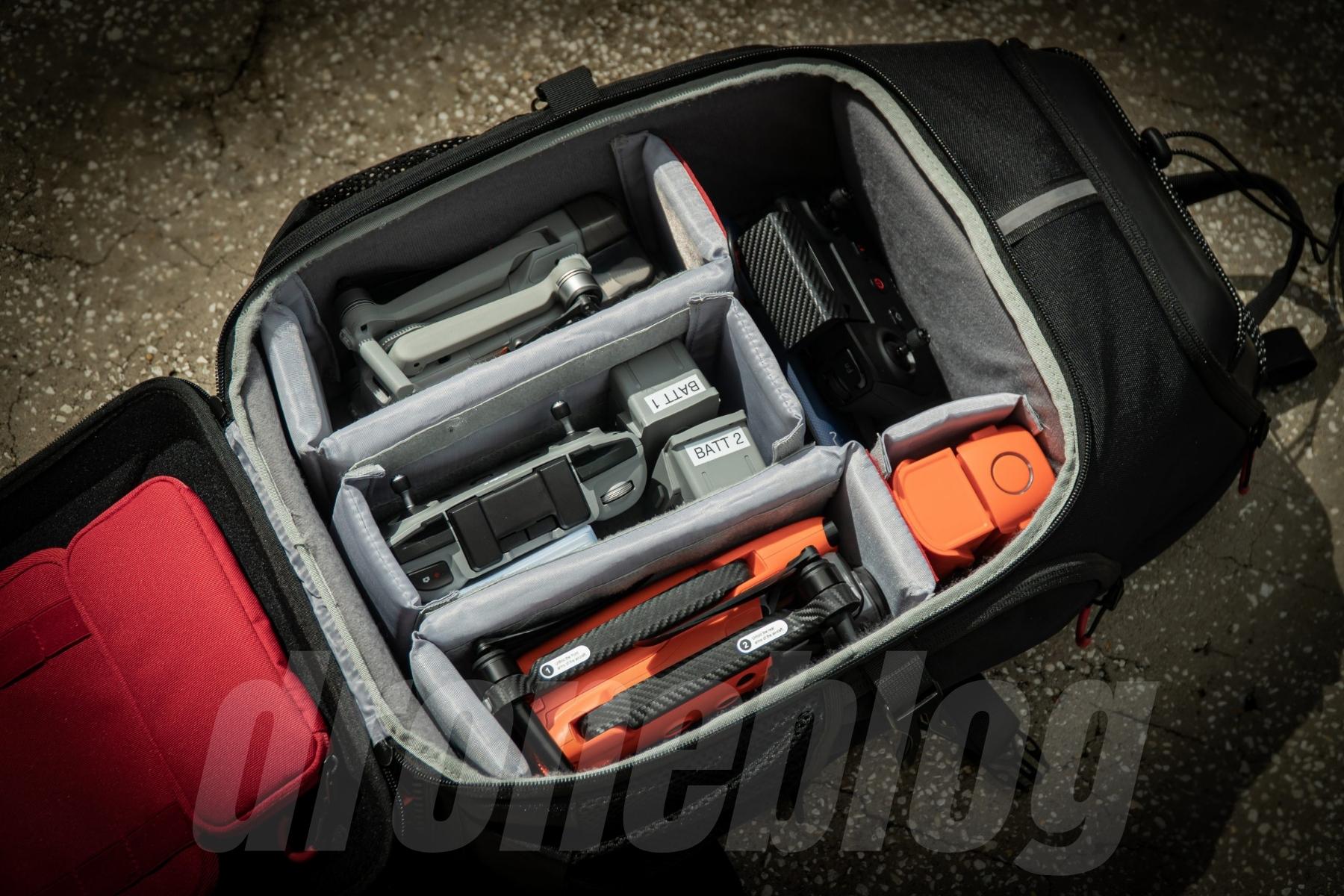

One of the reasons the Autel Evo Lite+ and Air 2S comparison is such a level playing field is the fact that they have many of the same specs and much of the same equipment included in their respective bundles/combos.
Because both of these drones have been reviewed thoroughly by Droneblog, we won’t go through an item-by-item review. We will instead compare the drones, cameras, and photo and video capabilities.
Below is a list of what is included with each drone.


Autel Evo Lite+ Premium Bundle
Includes the following:
- Autel Evo Lite+ Drone
- Remote Control
- 3 Intelligent Flight Batteries
- ND Filters w/case (4/8/16/32)
- Battery Charger
- AC Power Cable
- 3 Battery Multi Charger
- 5 Pairs of Propellers
- Gimbal Protector
- RC Charging Cable
- Lightning, Micro-USB, and USB-C Cables
- Shoulder Bag
» MORE: Autel Evo Lite+ Review
DJI Air 2S FlyMore Combo
- Air 2S Drone
- RC-N1 Remote Controller
- 3 Intelligent Flight Batteries
- ND filters w/case (4/8/16/32)
- Extra Pair of removable Thumbsticks
- Flight Battery Attachment to charge 2 USB devices
- Battery Charger
- AC Power Cable
- 3 Battery Charging Hub
- 4 Extra Pairs of Low-Noise Propellers
- Gimbal Protector
- USB C Cable (to charge the RC)
- USB C to USB C, Lightning, and Micro cables for the RC
- DJI Combo Bag
» MORE: DJI Air 2S – A Complete Real-World Review
Remote controller
Regardless of the type of flying you are doing, having an ergonomic remote controller (hereafter referred to as RC) is a must.
With both of the RCs from Autel and DJI, obvious care has been put into the build quality and user’s connection to the flying experience.


Evo Lite+ RC
The Evo Lite and Nano Series introduced a much-needed remote controller redesign, over the previous Evo I and Evo II RCs.
Although the previous RC was innovative, with its 3″ LCD screen with Liveview, enabling the drone to be controlled without a smart device, it was very top-heavy. Add to this the dual multi-directional antennas, and you had an RC that wasn’t as comfortable to fly with as, say, the new iteration of the remote controller.
One of the first noticeable things about the redesign is that the RC feels and even looks like an XBox One controller. This is good. As many XBox gamers who play for hours on end can tell you, the XBox One controller is comfortable. The same goes for the Evo Lite+ controller.
The next noticeable redesign feature is the integrated antenna/smartphone holder. Gone are the days of the multi-directional rabbit ear antennas.
The antenna and mount unit are housed together and retractable, sliding down into the RC, for easier storage. While this is in no way a new concept (see DJI), it is a much-needed design change, as there are fewer moving parts to worry about snapping or breaking off.
While the new RC is indeed ergonomic, it still suffers from being a bit top-heavy, as is the case with many remote controllers that have a top-mounted smartphone holder. I’d say it is slightly more top-heavy than the DJI RC-N1 included with the Air2S FlyMore combo.
An area of concern that I do have with the Evo Lite+ RC is that when the control sticks are removed for transport or storage, there is nowhere on the controller to store them.
Although I am not in the habit of removing the sticks, if I did, I would not want to have to put them in a pants pocket or have them rolling around in a backpack, drone bag, or case.
Thankfully, there are a few 3rd party 3D printed options online to house the sticks on the controller, for just a few dollars.
DJI Air 2S Controller (RC-N1)
The RC-N1 controller is used with many, if not most, of the new DJI lines of drones:
- DJI Mini 2
- DJI Mini 3 Pro
- DJI Mavic Air 2
- DJI Air 2S
- Mavic 3 & 3 Cine
DJI, like Autel, nailed the ergonomics of the RC-N1 controller. The controller feels very solid in hand and very well made with no flexing or creaking. This is despite the fact that the RC looks like a plain gray rectangle.
As with the Evo Lite RC, but done first, the Air 2S RC no longer has rabbit ear antennas that must be flipped up and facing the correct way to work properly. This was something I disliked with the previous versions of the Mavic series, and I am glad to see them done away with.
The dual-purpose antenna and smartphone holder/mount on the Air 2S remote slide up from inside the body of the remote controller. Aside from eliminating a failure point (floppy antennas), the retracting antenna/mount enables the RC to be stored easier, in less space.
One of the things I especially like is that, similar to the original Mavic Air and Mavic 2, the Air 2S has removable flight controller sticks that can be tucked away in the body of the remote controller.
For operators like myself, this is a plus, as I store my RC with the sticks installed and the included spare pair housed in the body of the RC.
Intellegent Batteries
When it comes to the sets of batteries included in each of these combos, Autel and DJI both took different approaches.
The Autel batteries mount by sliding the battery into the backside of the drone, whereas the DJI batteries are installed by pressing them down from the top.
There are a couple of other noticeable differences as well.
Evo Lite+ Batteries


Right off the bat, the Evo Lite batteries are noticeably larger than those found on the Air 2S. This is for a good reason.
The first reason being the drone itself is larger than the Air 2S, by a good inch and a half.
The second reason is that the larger battery has a larger power capacity (6,175mAh vs. the Air 2S 3,500 mAh).
What does this mean? It means that the Evo Lite battery gets a few more minutes of flight time than the Air 2S. Autel says 40 minutes.
How does the battery perform in real-world tests?
Marvelously. I don’t say this lightly. With all of my drones, I have made it a practice to return-to-home around the 35% mark. This generally comes to around 20 minutes or so.
With the Evo Lite+, I’m slightly out past 30 minutes or so at 35%. This difference in staying up in the air longer is noticeable, especially when on jobs, where every second counts.
During some flights, I literally thought in disbelief, “is it time to land and change batteries yet? No?? Why not???”
Air 2S Batteries


As mentioned, the Air 2S batteries are smaller than the Evo Lite+ and offer a maximum flight time of “34 minutes” or so.
Sadly, I have never reached the 34-minute mark. Due to my practice of landing at the 35% mark or sometimes therein, I am getting barely just about 20 minutes or so.
With these short times, I find myself changing the 3 batteries constantly during shoots, and rushing through longer shoots. I keep telling myself to get a 4th battery, however, I keep neglecting to.
If anyone is wondering what the black areas are on the Air 2S batteries, those are just velcro pads onto which I affix FAA-approved strobes for night flights and super bright days when it is difficult to keep the drone within VLOS (visual line of sight).
The Actual Drones


Here we will discuss the similarities and differences in the actual drone bodies, size, weight, and flight characteristics.
Colors
The Autel Evo Lite+ comes in 3 different colors: Classic Orange, Deep Space Gray, and Artic White. Whereas the Air 2S comes in one color: Gray.
Previously, for the Evo Lite+ review, I was flying the Deep Space Gray model, as I wanted something that matched my Air 2S.
However, due to forces beyond my control (a bird strike, resulting in the Evo Lite+ drowning), I am now flying the Classic Orange. I must say that the Orange is a fair bit easier to see in the bright Central Florida sunlight I fly in.
As mentioned, the Air 2S is only available in one color. Gray. Although this may be the case, I do enjoy the toned-downed gray color of the Air 2S, if nothing but to remain slightly less noticeable when flying in residential neighborhoods.
Size and Weight
When handling the 2 drones, the larger size of the Evo Lite+ is immediately apparent.


When I took the Evo Lite+ out of its bag for the very first time, I thought, “wow, this is a sturdy drone.”
In hand, it feels very solid and noticeably heavier than the Air 2S. This is no illusion. The Evo Lite+ weighs in at 835g, while the Air 2S sits at a svelt 595g. The Evo Lite+ is actually only 60g lighter than the DJI Mavic 3!
Reading this, it might not seem like a drastic weight difference between the Evo Lite+ and the Air 2S. It’s when realizing the weight difference between the 2 drones (240g) is just about the weight of the Mini 3 Pro with a standard battery (249g), then that changes things.


The size difference is noticeable in-air as well. I’ll explain.
I like getting views and perspectives that require me to squeeze through smaller and tighter areas. With the Air 2S, this is possible, and I have done so on quite a few occasions, confidently.
When trying to replicate these same shots while out and about testing the Evo Lite+, the Evo shots were far more difficult to execute, and I wasn’t exactly confident enough to perform many of them.


That extra inch to an inch and a half combined length on the arms and props of the Lite+ really makes a difference if you are like me and try to push the boundary of where the drone can fit.
Regardless of the weight difference, both drones performed quite well in our uber-windy pre-storm conditions that seem to pop up from nowhere here in Florida. I successfully flew both drones while taking video in gusts of 25+ miles per hour with no worries.
Flight Characteristics
This is where operator preference really comes into play, as both of these drones, in my opinion, feel drastically different from each other.


Evo Lite+
Having owned previous Autel drones, I was immediately familiar with the feel of the Lite+. Like with the other Evos I have flown, the Lite+ likewise handles slow and deliberate.
At first, I thought this was because of the vision sensors being on and detecting an obstacle. This was not the case, as even when I turned the obstacle avoidance off, it continued to move in a slower manner than I am used to with my DJI drones.
After some tinkering, I readjusted the EXP values associated with movement, primarily associated with forward, backward, yaw, etc., and the drone began to fly a bit more in the manner I like.
Newer drone operators might really like the way the Evo Lite+ flies, right out of the box, without adjusting any of the control settings. The Evo Lite+ is very easy to fly or even learn to fly on.
The different flight modes are:
- Standard (Normal)
- Smooth (Cinematic)
- Ludicrous (Sport)
Sadly, there is no switch on the remote controller that enables you to jump between modes. Thankfully, there are two options that enable switching between modes:
- Use the onscreen option found on the upper left of the screen, next to the Autel logo (see below) or,
- Set up the function button to act as the switch. This can be programmed to swap between the modes at the press of the shoulder FN button


